

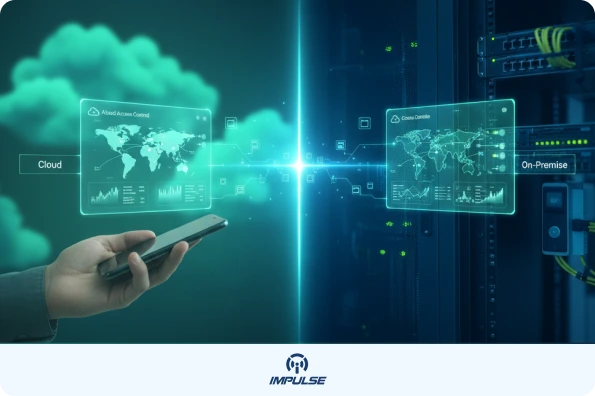
More than 60% of businesses are now migrating their physical security infrastructure to the cloud a shift that reflects how dramatically the access control landscape has transformed. The traditional choice between cloud and on-premise systems is no longer about simple preference; it’s a strategic decision that affects operational efficiency, security effectiveness, and long-term costs. Understanding which platform aligns with your organization’s unique needs can mean the difference between a security system that enables growth and one that becomes a bottleneck.
This comprehensive guide explores the fundamental differences between cloud and on-premise access control platforms, helping you make an informed decision that protects your assets, people, and premises while supporting your business growth.
Understanding Access Control Systems: The Foundation of Modern Security
Before diving into the cloud versus on-premise debate, it’s essential to understand what access control systems do. At their core, these systems regulate and monitor who can enter specific areas within a facility. They replace traditional lock-and-key mechanisms with sophisticated electronic systems that use credentials like RFID cards, QR code readers, biometric scanners, or mobile devices to grant or deny access.
Modern access control platforms integrate hardware components such as door controllers, card readers, and exit buttons with software that manages user permissions, tracks entry logs, and generates security reports. Whether you’re managing a single door or hundreds across multiple locations, the right system provides not just security, but also valuable operational insights.
Cloud-Based Access Control: Flexibility and Scalability in the Digital Age
What is Cloud-Based Access Control?
Cloud-based access control systems leverage internet connectivity to store and manage security data on remote servers hosted by third-party providers. Rather than maintaining physical servers on-site, businesses access their security infrastructure through web-based dashboards or mobile applications, enabling management from anywhere with an internet connection.
Key Advantages of Cloud Access Control
Remote Management and Accessibility
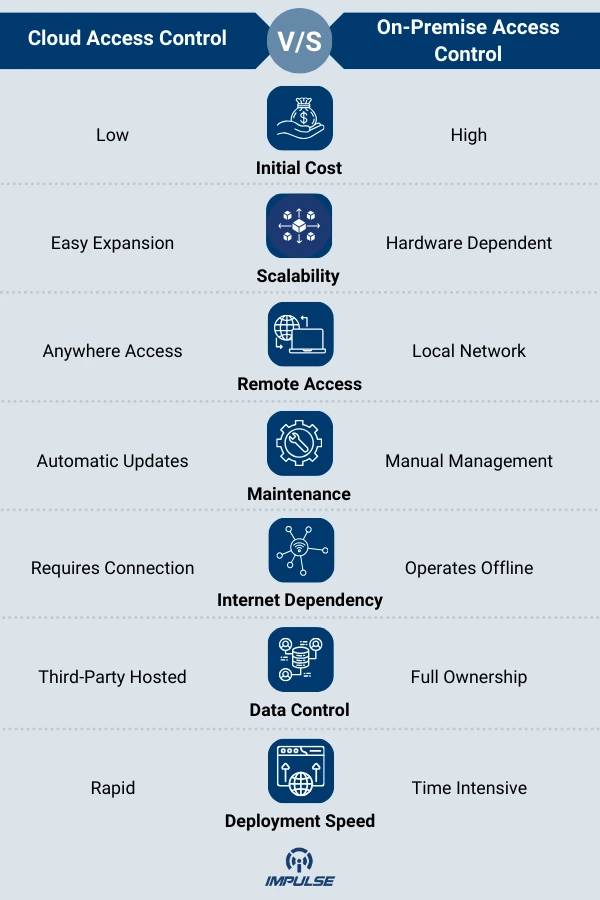
The most compelling advantage of cloud access control is the ability to manage your security infrastructure from any location. Security administrators can grant or revoke access permissions, view real-time entry logs, and respond to security incidents without being physically present. This capability is invaluable for businesses with multiple locations, remote workforces, or facilities that operate outside traditional business hours.
Scalability and Rapid Deployment
Cloud platforms excel at scalability. Adding new doors, locations, or users typically requires minimal hardware investment and can be accomplished quickly through software configuration. Modern TCP/IP access control boards like the TCP/IP Two Doors Access Control System or the TCP/IP Four Doors Access Control System can be integrated seamlessly with cloud platforms, offering features like multi-computer management and regional interlocking without extensive on-site infrastructure.
Lower Upfront Costs and Predictable Expenses
Cloud solutions operate on a subscription model, eliminating the need for significant capital expenditure on servers, IT infrastructure, and installation. Businesses pay predictable monthly or annual fee s that typically include software updates, technical support, maintenance, and cloud storage. This financial model is particularly attractive for small to medium-sized businesses or organizations with limited IT budgets.
Automatic Updates and Enhanced Security
Cloud providers continuously update their platforms with the latest security patches, features, and improvements. These updates happen automatically, ensuring your system benefits from the newest cybersecurity protections without requiring manual intervention or system downtime. Leading cloud platforms leverage enterprise-grade security from providers like Amazon Web Services (AWS), offering encryption, penetration testing, and compliance with standards like GDPR.
Integration Capabilities
Modern cloud platforms offer powerful integration options with other security systems, including video surveillance, visitor management, and identity access management (IAM). They also support advanced features like dynamic 2D code authentication and mobile credentialing, allowing employees to use their smartphones instead of traditional keycards.
Considerations and Potential Limitations
Internet Dependency
The primary limitation of cloud-based systems is their reliance on internet connectivity. While many modern solutions offer offline backup capabilities that sync when connectivity is restored, a complete internet outage could temporarily affect real-time management capabilities. Organizations in areas with unreliable internet infrastructure should carefully evaluate this factor.
Data Privacy Concerns
Some businesses, particularly those in highly regulated industries or handling sensitive information, may have reservations about storing access control data on third-party servers. However, reputable cloud providers implement robust encryption protocols, both in transit and at rest, along with strict compliance certifications that often exceed what individual organizations can maintain on-premise.
Ongoing Subscription Costs
While cloud systems reduce upfront investment, the subscription model creates ongoing operational expenses. Organizations should conduct long-term cost analysis to compare total cost of ownership over their typical system lifecycle.
On-Premise Access Control: Control and Independence
What is On-Premise Access Control?
On-premise access control systems host all software, data, and management capabilities on local servers within the organization’s facility. The business maintains complete ownership and control over the entire security infrastructure, from hardware to data storage.
Key Advantages of On-Premise Systems
Complete Data Control and Privacy
For organizations with stringent data sovereignty requirements or those operating in regulated industries like healthcare, finance, or government, on-premise solutions offer unparalleled control. All access logs, user credentials, and security data remain within the organization’s physical and digital perimeter, never leaving the premises.
No Internet Dependency
On-premise systems can operate entirely independent of internet connectivity. This makes them ideal for facilities in remote locations, critical infrastructure sites, or environments where network reliability is a concern. The system continues functioning during internet outages, ensuring uninterrupted physical security.
Customization Flexibility
On-premise platforms typically offer greater customization capabilities, allowing organizations to tailor the system precisely to their unique requirements. This is particularly valuable for facilities with legacy systems, specialized hardware, or complex security protocols that require deep integration. Components like the Door Exit Push Button Access Control can be configured to meet specific operational workflows.
Long-Term Cost Considerations
While on-premise systems require significant upfront investment, they eliminate ongoing subscription fees. For organizations planning to maintain the same system for many years, the total cost of ownership may be lower than cloud alternatives, particularly at scale.
Integration with Legacy Systems
Organizations with existing security infrastructure may find on-premise solutions easier to integrate with legacy systems. Whether using traditional MIFARE 13.56MHz IC Cards or specialized readers, on-premise systems offer the flexibility to support various credential technologies simultaneously.
Considerations and Potential Limitations
Higher Initial Investment
On-premise systems require substantial capital expenditure for servers, software licenses, network infrastructure, and installation. Organizations must also account for the cost of dedicated IT personnel or contractors to manage and maintain the system.
Maintenance Responsibility
Unlike cloud solutions, on-premise systems place the burden of maintenance, updates, and troubleshooting entirely on the organization. This requires ongoing IT resources and expertise to ensure the system remains secure and functional. Software updates must be manually deployed, and security patches require proactive management.
Scalability Challenges
Expanding an on-premise system typically involves purchasing additional hardware, reconfiguring servers, and potentially upgrading network infrastructure. This makes growth more costly and time-consuming compared to cloud alternatives.
Limited Remote Access
While some on-premise systems can be configured for remote access through VPNs or specialized software, this capability is not as seamless as cloud-based platforms. Managing security from off-site locations often requires additional configuration and security measures.
Making the Right Choice: Decision Framework for Your Business
Assess Your Business Requirements
Organizational Size and Structure
Small to medium businesses with limited IT resources typically benefit from cloud-based solutions due to lower upfront costs and minimal maintenance requirements. Large enterprises with established IT departments may have the resources to manage on-premise systems effectively.
Geographic Distribution
Organizations with multiple locations strongly favor cloud platforms for their centralized management capabilities. A security administrator can manage facilities across different cities, states, or countries from a single dashboard, dramatically simplifying operations.
Industry and Compliance Requirements
Highly regulated industries including healthcare (HIPAA), finance (PCI-DSS), and government may require on-premise solutions to meet specific data sovereignty and compliance mandates. However, many cloud providers now offer compliance certifications that satisfy most regulatory requirements.
Budget and Financial Model
Consider both immediate financial capacity and long-term budget planning. Cloud systems offer lower barrier to entry with predictable operational expenses, while on-premise systems require larger upfront investment but may offer lower total cost of ownership over extended periods.
Evaluate Technical Infrastructure
Internet Reliability
Assess the quality and reliability of your internet connectivity. Facilities with robust, redundant internet connections are well-suited for cloud solutions. Those in areas with limited connectivity may require on-premise systems.
IT Resources and Expertise
Honestly evaluate your internal IT capabilities. On-premise systems demand ongoing technical expertise for maintenance, updates, and troubleshooting. Cloud solutions reduce this burden but still require someone to manage user permissions and system configuration.
Integration Needs
Consider what other systems need to integrate with your access control platform. Cloud solutions typically offer more flexible APIs and integrations with modern security technologies, video management systems, and enterprise software.
Consider Future Growth and Flexibility
Scalability Requirements
If your organization anticipates significant growth, frequent location changes, or dynamic workforce fluctuations, cloud platforms provide superior scalability. Adding users or locations requires minimal investment and can be accomplished quickly.
Technology Evolution
The security industry evolves rapidly, with new technologies like biometric authentication, mobile credentials, and artificial intelligence continuously emerging. Cloud platforms typically adopt new features faster than on-premise systems, which may require hardware upgrades to support advanced capabilities.
Hybrid Approaches: The Best of Both Worlds
Some organizations are adopting hybrid models that combine cloud and on-premise elements. This approach might involve using cloud-based management interfaces while maintaining local servers for critical data storage, or deploying cloud solutions for less sensitive facilities while keeping high-security areas on-premise.
Hybrid systems can offer flexibility but add complexity to management and maintenance. They work best for large organizations with sophisticated IT departments capable of managing multiple platforms simultaneously.
Implementation Best Practices
Regardless of which platform you choose, successful implementation requires careful planning:
Conduct a Security Audit
Evaluate your current security posture, identify vulnerabilities, and define clear objectives for your new system. Understanding your baseline helps measure improvement and ROI.
Engage Stakeholders Early
Involve security personnel, IT staff, facilities management, and end-users in the selection process. Their input ensures the chosen solution meets operational needs and gains organizational buy-in.
Plan for Training
Even the most sophisticated system fails without proper user training. Develop comprehensive training programs for administrators, security staff, and end-users. Modern systems using advanced components like the ID Card Writer for credential management require users to understand proper procedures for card programming and distribution.
Establish Security Protocols
Define clear policies for credential management, access level assignments, and incident response procedures. Document these protocols and ensure all relevant personnel understand their responsibilities.
Test Thoroughly
Before full deployment, conduct extensive testing of all system components, including door controllers, readers, software interfaces, and fire linkage features that ensure doors unlock during emergencies.
Conclusion
The choice between cloud-based and on-premise access control systems is not about which technology is inherently superior both platforms offer legitimate advantages depending on your specific circumstances. Cloud solutions excel in flexibility, scalability, remote management, and lower upfront costs, making them ideal for growing businesses, multi-site operations, and organizations prioritizing convenience. On-premise systems provide unmatched data control, independence from internet connectivity, and customization capabilities that remain essential for certain industries and security-critical environments.
The right decision emerges from carefully evaluating your organization’s unique requirements: budget constraints, IT resources, compliance obligations, geographic distribution, and long-term growth plans. Many businesses find that their needs fall clearly into one category, while others may benefit from hybrid approaches that leverage the strengths of both platforms.
What remains constant across both options is the critical importance of choosing quality hardware components and partnering with experienced security professionals. Modern TCP/IP access control boards with advanced features like multi-computer management, regional interlocking, and cloud platform integration provide the foundation for secure, reliable systems regardless of your chosen deployment model.
As you move forward with your decision, remember that access control is not merely about locking doors it’s about creating a comprehensive security ecosystem that protects your people, assets, and operations while enabling business efficiency. Take the time to assess your needs thoroughly, consult with security experts, and invest in solutions that will serve your organization not just today, but well into the future.