


Ever wondered why some areas of your office have perfect WiFi while others seem to exist in a connectivity black hole? The answer lies in the strategic placement of wireless access points (WAPs). These critical network components can make or break your organization’s connectivity, with poor positioning leading to dead zones and signal interference, while optimal placement delivers seamless performance throughout your facility.
Understanding the Fundamentals of Wireless Access Point Deployment
Before diving into placement strategies, it’s essential to understand what influences wireless network performance. Several key factors determine how effectively your access points will serve your organization:
Coverage Area and Signal Propagation
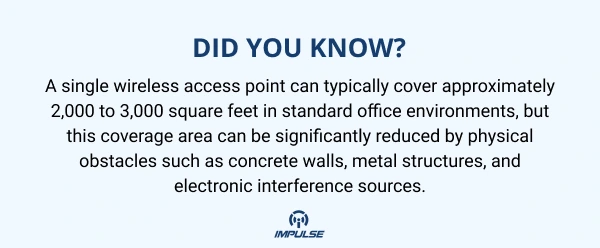
The effectiveness of wireless access point placement depends largely on understanding signal propagation patterns. Radio frequency signals don’t travel in perfectly spherical patterns they’re affected by building materials, furniture, and even the number of people in a space. When planning your network infrastructure, consider that signals weaken as they pass through obstacles, with different materials causing varying degrees of attenuation.
Modern security systems, including advanced surveillance solutions like the Fixed lens Network Bullet Camera (IMP-LX-BLTF-300-3600) with built-in analytics capabilities, often require robust wireless connectivity to transmit high-definition video streams reliably. This makes proper AP placement even more critical in integrated security environments.
Ceiling vs. Wall Mounting: The Great Debate
Access points mounted below ceilings generally provide superior coverage compared to wall-mounted alternatives, as ceiling placement offers fewer signal obstructions and allows for more uniform signal distribution throughout the space. However, this doesn’t mean wall mounting is never appropriate.
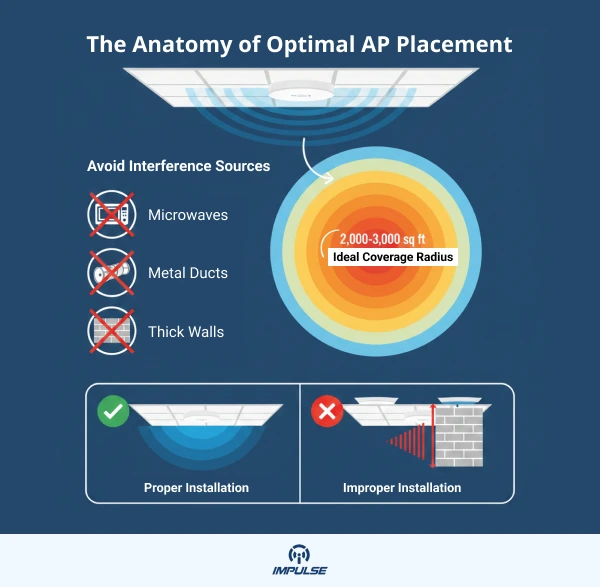
Ceiling-mounted access points should always be installed below the ceiling tiles rather than hidden above them. The area above drop ceilings often contains metallic structures like HVAC ducts, electrical conduit, and plumbing all of which can severely attenuate RF transmissions and create performance bottlenecks.
Strategic Positioning: Best Practices for Maximum Coverage
Centralized Location Strategy
Installing access points in central locations away from corners, walls, and physical obstructions provides maximum signal coverage, ensuring that wireless signals can reach all areas of your facility with minimal dead zones. This central positioning approach is particularly effective in open-plan offices and commercial spaces.
For organizations deploying comprehensive surveillance systems with devices like the MOTORIZED IR-DOME CAMERA, which captures high-resolution footage at 2592 x 1944 resolution, maintaining strong wireless connectivity across monitoring zones is essential for uninterrupted video streaming.
Avoiding Common Interference Sources
Electronic interference represents one of the most overlooked challenges in wireless network deployment. Common culprits include:
- Microwave ovens (operating at 2.4 GHz, the same frequency as many wireless networks)
- Cordless phones and baby monitors
- Bluetooth devices and wireless speakers
- Large metal surfaces and reflective materials
- Air conditioning units and industrial machinery
When integrating your wireless infrastructure with security systems managed through platforms like the Video Management System, which handles multiple camera feeds simultaneously, ensuring interference-free access point placement becomes crucial for maintaining system reliability.
The Room vs. Hallway Placement Decision
Placing access points inside rooms rather than in hallways typically provides better performance where users need it most, while still maintaining adequate hallway coverage, with room walls serving as natural buffers against channel interference. This approach has become increasingly effective with modern 802.11ac (Wi-Fi 5) and Wi-Fi 6 standards.
Advanced Considerations for High-Density Environments
Capacity Planning Beyond Coverage
While coverage is important, capacity planning has become equally critical in modern deployments. It’s no longer sufficient to simply ensure signal reaches every corner you must also ensure adequate bandwidth for the expected number of concurrent users and applications.
A general guideline suggests planning for approximately 30 active users per access point in typical office environments, though this can vary based on application requirements. For organizations using bandwidth-intensive applications or managing multiple video streams through systems like the 32 Channel NVR with 320 Mbps recording bandwidth capability, more conservative estimates may be necessary.
Channel Planning and Co-Channel Interference
Wireless channel management is a critical yet often overlooked aspect of access point placement. In the 2.4 GHz band, only channels 1, 6, and 11 are non-overlapping, making careful channel assignment essential to minimize interference between adjacent access points.
The 5 GHz band offers significantly more non-overlapping channels, which is why modern deployments increasingly prioritize 5 GHz operation. When designing your channel plan, ensure adjacent access points operate on different channels to minimize co-channel interference (CCI) and maximize throughput.
Vertical Coverage in Multi-Story Buildings
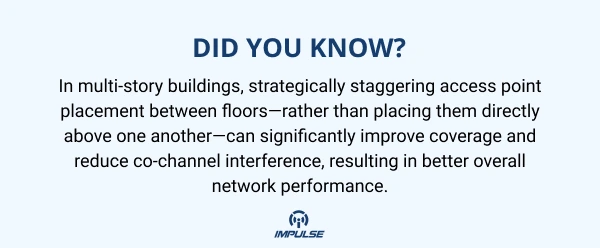
For facilities spanning multiple floors, staggering access point placement between floors helps cover both vertical and horizontal space efficiently, creating overlapping coverage zones that facilitate seamless roaming as users move throughout the building.
This staggered approach is particularly important in environments with integrated security and network infrastructure, where maintaining connectivity for both user devices and security equipment like surveillance cameras is essential.
Site Survey: The Foundation of Successful Deployment
Before installing a single access point, conducting a comprehensive wireless site survey is non-negotiable. This process involves:
Pre-Deployment Planning
Conducting a site survey helps identify areas with poor coverage, high demand, and potential sources of interference, enabling optimal location determination for each access point. Professional site surveys utilize specialized software and hardware to create predictive models of wireless coverage, signal-to-noise ratios, and potential interference patterns.
Modern site survey tools can generate heat maps showing predicted signal strength throughout your facility, allowing you to visualize coverage before committing to physical installations. These predictive surveys should account for:
- Expected client device types and quantities
- Application bandwidth requirements
- Building materials and floor plans
- Existing sources of RF interference
- Future growth and scalability needs
Post-Deployment Validation
After installing your access points, conduct a validation survey to ensure actual performance matches predictions. This involves walking through the facility with specialized equipment, measuring real-world signal strength, throughput, and identifying any unexpected coverage gaps or interference issues.
For organizations managing complex integrated systems combining network infrastructure with security solutions monitored through comprehensive platforms, post-deployment validation ensures all components communicate reliably across the wireless network.
Mounting Specifications and Physical Security
Hardware Selection and Orientation
Different access point models have varying antenna configurations and radiation patterns. Following manufacturer guidelines for AP orientation, such as horizontal mounting for indoor units with internal antennas, ensures optimal signal propagation and performance.
When selecting mounting hardware, prioritize solutions that:
- Allow for quick serviceability and future upgrades
- Provide adequate ventilation for thermal management
- Offer cable management capabilities
- Meet relevant building codes and standards
- Enable secure attachment to prevent theft or tampering
Physical Security Considerations
Access point placement should consider physical security, with some environments requiring locking enclosures or positioning APs beyond public reach, while other settings make such measures unnecessary based on security policies and operational requirements. Evaluate your specific environment to determine appropriate physical security measures.
In facilities with comprehensive security infrastructure, coordinating wireless access point placement with surveillance camera coverage areas can provide an additional layer of protection for network equipment while ensuring cameras maintain reliable connectivity.
Integration with Comprehensive Network Infrastructure
Unified System Architecture
Modern organizations increasingly deploy unified systems that integrate wireless networking with security, access control, and monitoring capabilities. When planning access point placement, consider how your wireless infrastructure supports these integrated systems.
For instance, if you’re deploying surveillance cameras throughout your facility, ensure access points are positioned to provide reliable connectivity to camera locations. High-resolution cameras require substantial bandwidth the Network Bullet Camera mentioned earlier supports quad-stream capabilities and edge analytics, all of which demand consistent, high-quality wireless connections.
Scalability and Future-Proofing
As wireless technology evolves rapidly with Wi-Fi 6E and Wi-Fi 7 already on the horizon your access point placement strategy should accommodate future upgrades. Access points are now replaced every 2-4 years rather than every 3-5 years, requiring mounting solutions that allow quick swap-outs without extensive rework.
Choose mounting solutions and cable infrastructure that can accommodate larger, more capable access points with additional radios for emerging technologies like 6 GHz operation, Bluetooth Low Energy, Zigbee, and IoT connectivity.
Network Management and Monitoring
Centralized Management Platforms
Effective wireless network management extends beyond physical placement to include robust monitoring and administration tools. Enterprise-grade management platforms enable:
- Real-time performance monitoring across all access points
- Automated channel optimization and interference mitigation
- Predictive analytics for capacity planning
- Centralized firmware updates and configuration management
- Detailed reporting on usage patterns and performance metrics
Organizations utilizing comprehensive management solutions for their security infrastructure can benefit from similar centralized approaches to wireless network administration, creating a cohesive operational environment.
Ongoing Optimization
Wireless network performance isn’t static it changes as your environment evolves. Regular optimization should include:
- Periodic spectrum analysis to identify new interference sources
- Capacity adjustments as user counts and application requirements change
- Firmware updates to address security vulnerabilities and performance improvements
- Coverage adjustments as office layouts change or buildings are renovated
Environmental Considerations for Specialized Deployments
Warehouse and Industrial Settings
High-ceiling environments present unique challenges for wireless deployments. In open and high-ceiling structures, access points should be kept within recommended mounting heights of 20-30 feet, ideally under 40 feet, to avoid weakened signal strength.
Industrial environments often include significant metal surfaces, moving machinery, and other sources of interference that require more sophisticated planning and potentially more access points than comparable office spaces.
Healthcare Facilities
Healthcare environments demand exceptional reliability due to life-critical applications and medical device connectivity requirements. Access point placement must account for:
- Interference from medical equipment
- Strict regulatory compliance requirements
- Patient privacy and security considerations
- Support for real-time location services (RTLS)
- Seamless roaming for mobile clinical devices
Educational Institutions
Schools, universities, and training facilities face unique challenges with high user densities, diverse device types, and varying bandwidth requirements across different spaces. Lecture halls, libraries, cafeterias, and outdoor gathering spaces each require tailored approaches to access point placement and capacity planning.
Regulatory Compliance and Standards
Ensure your wireless deployment complies with relevant industry standards and regulations, including:
- FCC regulations for RF emissions and power levels
- Building codes for cable installation and fire safety
- Industry-specific standards like HIPAA for healthcare or PCI-DSS for retail
- Local regulations regarding wireless spectrum usage
Professional deployments should reference authoritative documents such as ANSI/BICSI 008-2024 for wireless LAN system design and implementation best practices, ensuring your infrastructure meets industry standards for performance, reliability, and safety.
Conclusion
Strategic wireless access point placement represents the foundation upon which reliable, high-performance networks are built. By following established best practices conducting thorough site surveys, avoiding common interference sources, choosing appropriate mounting locations, and planning for capacity as well as coverage organizations can create wireless infrastructures that meet current demands while remaining flexible enough to accommodate future growth.
Remember that successful wireless deployments require ongoing attention and optimization. Regular performance monitoring, periodic site surveys as environments change, and proactive capacity planning ensure your network continues meeting user expectations and business requirements over time.
Whether you’re supporting a basic office environment or a complex integrated system combining network infrastructure with advanced security solutions, the principles of strategic access point placement remain constant: understand your environment, plan comprehensively, implement carefully, and monitor continuously.